Structure And Organization of Computer System (part-2)
Computer Functions & Structures

We will discuss:
Structure-Top level
Structure and function
Structure and function are two important concepts in the design and description of complex systems.
- Structure: refers to the way in which the components of a system are arranged and interconnected. The structure of a system can be represented by a diagram, called a block diagram. A block diagram shows the components of the system and their interconnections.
- Function: refers to the purpose or behavior of a system. The function of a system can be described by a flowchart. A flowchart shows the steps that the system takes to perform its task.
The hierarchical nature of a system is necessary for its design and description because it allows the designer to focus on one level of detail at a time. At each level, the designer is concerned with the structure and function of the components at that level. For example; A computer can be thought of as a hierarchical system. At the highest level, the computer is composed of the CPU, memory, and storage devices. At the next level, the CPU is composed of the ALU, control unit, and registers. At the next level, the ALU is composed of logic gates.
The
structure and function of a system are closely related. The structure of the
system determines how it can function, and the function of the system
determines the requirements for its structure.
Here
are some additional things to know about structure and function:
The structure of a system can be static or dynamic. A static structure is one that does not change over time. A dynamic structure is one that changes over time.
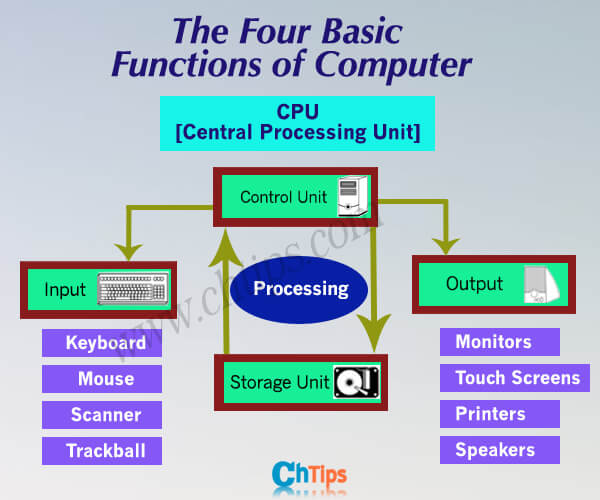
Functions

Computer
functions are the basic tasks that a computer can perform. They are:
Data
processing is the manipulation of data to produce information.
This can include tasks such as adding, subtracting, multiplying, and dividing
numbers; sorting data; and searching for data.
Data
storage is the preservation of data over time. This can be
done on physical media, such as hard drives and CDs, or in the cloud.
Data
movement is the transfer of data from one location to another.
This can be done within the computer, between computers, or between the
computer and other devices.
Control is
the ability to manage the flow of data and instructions in a computer system.
This includes tasks such as starting and stopping programs and allocating
resources to programs.
The functional view of a computer system is a way of looking at the system in terms of its functions. This view is useful for understanding how the different parts of the system work together to perform the basic tasks of data processing, data storage, data movement, and control.

The
operations of a computer system are the specific actions that the system takes
to perform its functions. Some of the common operations include:
Data movement: This can involve moving data between the CPU, memory, and storage devices.
.png)
Storage: This can involve storing data on physical media, such as hard drives and CDs, or in the cloud.
.png)
Processing from/to storage: This can involve reading data from storage and writing data to storage.
.png)
Processing from storage to I/O: This can involve sending data from storage to output devices, such as printers and monitors.
.png)
Structure
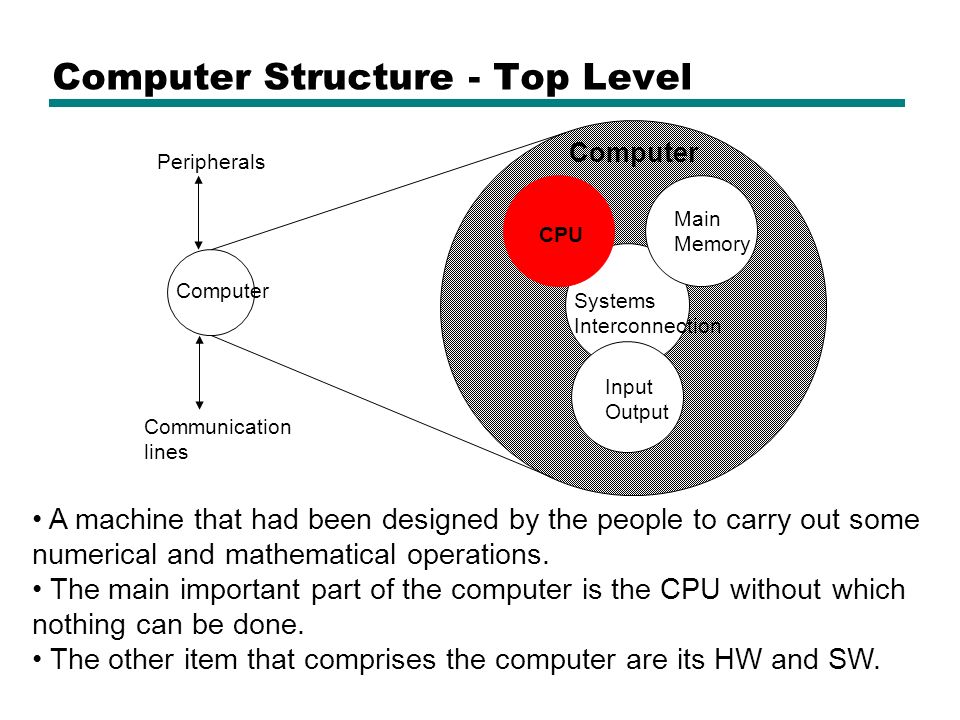
Structure - Top Level

The
top-level structure of a computer. It has four main components:
- Central processing unit (CPU): The CPU is the brain of the computer. It is responsible for executing instructions and performing calculations.
- Main memory (RAM): RAM is where the computer stores data that it is currently using. It is a volatile memory, which means that the data is lost when the computer is turned off.
- Input/output (I/O) devices: I/O devices allow the computer to interact with the outside world. They include devices such as keyboards, mice, monitors, printers, and storage devices.
- System interconnection: The system interconnection is the network that connects the CPU, RAM, and I/O devices. It allows the components to communicate with each other.
The CPU, RAM, and I/O devices are all connected to the system interconnection. The system interconnection is typically implemented using a bus, which is a shared set of wires that allows the components to communicate with each other.
Peripherals
are any of the many external devices that connect to a computer. They allow the
computer to interact with the outside world. Some common examples of
peripherals include:
- Keyboards
- Mice
- Monitors
- Printers
- Scanners
- Storage devices (such as hard drives and USB drives)
- Networking devices (such as routers and switches)
- Audio devices (such as speakers and microphones)
Peripherals
connect to the computer through a variety of communication lines. Some common
types of communication lines include:
- Serial ports: Serial ports are a type of communication line that allows two devices to communicate one bit at a time. They are typically used for connecting devices such as mice and keyboards.
- Parallel ports: Parallel ports are a type of communication line that allows two devices to communicate multiple bits at a time. They are typically used for connecting devices such as printers.
- Universal Serial Bus (USB): USB is a newer type of communication line that is becoming increasingly popular. It is a high-speed, versatile interface that can be used to connect a wide variety of devices, including keyboards, mice, printers, storage devices, and cameras.
- FireWire: FireWire is another high-speed communication line that is often used for connecting digital devices such as cameras and external hard drives.
- Ethernet: Ethernet is a type of communication line that is used to connect computers to a network. It is a high-speed, reliable interface that is commonly used in homes and businesses.
The
communication line between the CPU and the peripherals is called a bus. The bus
is a shared set of wires that allows the CPU and the peripherals to communicate
with each other. The bus is typically divided into multiple channels, each of
which can be used to carry a different type of data.
The
communication between the peripherals and the CPU is controlled by the
operating system. The operating system is responsible for managing the
resources of the computer, including the CPU, memory, and I/O devices. The
operating system also provides a set of drivers that allow the peripherals to
communicate with the CPU.
Structure - The CPU

The CPU, or Central Processing Unit, is the brain of the
computer. It is responsible for carrying out the instructions of the computer
program. The CPU is made up of three main components:
- The Arithmetic Logic Unit (ALU)
- The Control Unit (CU)
- The Registers
The
CPU is typically made up of millions of transistors, which are tiny electronic
switches. The transistors are arranged in a circuit that performs the functions
of the ALU, CU, and registers.
The
CPU is connected to the other parts of the computer, such as the RAM and the
I/O devices, by a bus. The bus is a set of wires that allows the CPU to
communicate with the other parts of the computer.
The
speed of the CPU is measured in gigahertz (GHz). A gigahertz is equal to one
billion cycles per second. The faster the CPU, the faster it can execute
instructions.
CPU organization
The
CPU controls everything that happens in the
computer. The CPU has three main parts:
- The register section stores data and instructions that the CPU is currently using.
- The ALU (Arithmetic Logic Unit) performs arithmetic and logical operations, such as addition, subtraction, multiplication, and division.
- The CU (Control Unit) controls the flow of instructions through the CPU. It tells the ALU what to do and when to do it.
The
CPU also has a few other parts, such as the clock, which controls the speed of
the CPU, and the bus, which connects the CPU to the other parts of the
computer.
The CPU works by fetching instructions from memory, decoding the instructions, and then executing the instructions. The instructions are stored in memory as a sequence of bits. The CPU fetches the instructions one at a time and decodes them into a format that the ALU can understand. The ALU then executes the instructions, which may involve performing arithmetic or logical operations or moving data from one part of the computer to another
Register Section

The
register section of the CPU is a collection of small, high-speed memory units
that are used to store data and instructions that are being used by the CPU.
The register section is located inside the CPU and is not accessible by the
programmer.
The
register section includes a variety of registers, such as:
- General-purpose registers: These registers can be used to store any type of data.
- Address registers: These registers store the addresses of data or instructions in memory.
- Control registers: Control registers store settings that control the basic operation of the CPU, such as how it addresses memory, handles interrupts, and uses coprocessors.
- Status registers: These registers store information about the state of the CPU, such as the current instruction being executed.
The
register section is an important part of the CPU. It allows the CPU to access
data and instructions quickly and efficiently. This helps to improve the
performance of the CPU.
Here
are some additional information about the register section:
- The number of registers in the register section varies from CPU to CPU.
- The size of the registers in the register section also varies from CPU to CPU.
- The register section is typically made up of volatile memory, which means that the data stored in the registers is lost when the power is turned off.
Arithmetic/Logic Unit (ALU)

The
Arithmetic Logic Unit (ALU) is a part of the CPU that performs arithmetic and
logical operations. The ALU can perform operations such as addition,
subtraction, multiplication, division, and logical operations such as AND, OR,
and NOT.
The
ALU is connected to the register section of the CPU. The register section
stores the data that the ALU needs to perform its operations. The ALU retrieves
the data from the register section, performs the operation, and then stores the
result back in the register section.
The
ALU is a very important part of the CPU. It is responsible for performing the
basic operations that are needed to execute instructions.
Here
are some additional information about the ALU:
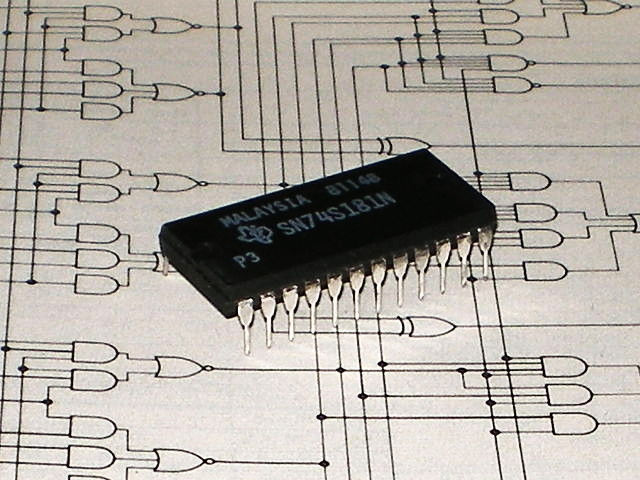
- The ALU is typically made up of logic gates, which are electronic circuits that can perform basic logical operations.
- The speed of the ALU is an important factor in determining the speed of the CPU.
- The ALU can be a single unit, or it can be divided into multiple units. In some CPUs, the ALU is shared by multiple cores.
Note: relation between registers and control unit
The
registers and the control unit are closely related parts of the CPU. The
registers store the data and instructions that are being used by the CPU, and
the control unit controls the flow of instructions through the CPU.
The
control unit uses the registers to store the following:
- The address of the next instruction to be executed.
- The operands for the current instruction.
- The results of the current instruction.
- The status of the CPU, such as the current mode of operation.
The
control unit uses the information stored in the registers to control the
following:
- The fetching of instructions from memory.
- The decoding of instructions.
- The execution of instructions.
- The transfer of data between the CPU and memory.
- The control of I/O devices.
The
registers and the control unit work together to ensure that the CPU can execute
instructions efficiently and effectively.
Here
are some additional details about the relationship between registers and the
control unit:
- The registers are typically located in the CPU's high-speed memory, which allows the control unit to access them quickly.
- The control unit uses a program counter to keep track of the address of the next instruction to be executed.
- The control unit uses a decoder to decode the instructions that are fetched from memory.
- The control unit uses a sequencer to control the order in which the instructions are executed.
The
registers and the control unit are essential parts of the CPU. They work
together to ensure that the CPU can execute instructions efficiently and
effectively.
Memory Subsystem
The
memory subsystem is a part of the computer that stores data and instructions.
It has two main types of memory:
- ROM (Read Only Memory): ROM is a type of memory that can only be read, not written to. The data stored in ROM is permanent and cannot be changed. ROM is used to store the BIOS, which is the basic input/output system. The BIOS is a set of instructions that the computer uses to start up and initialize its hardware.
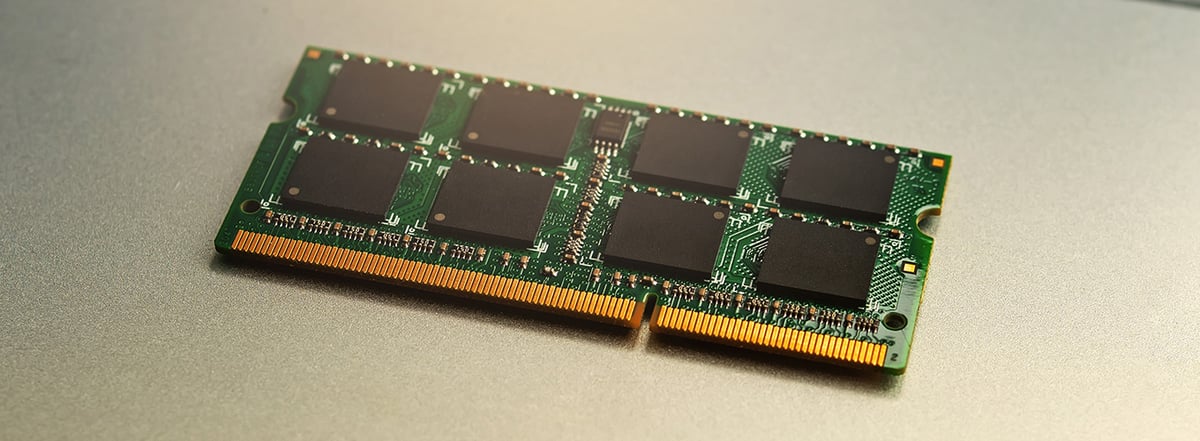
- RAM (Random Access Memory): RAM is a type of memory that can be read and written to. The data stored in RAM is volatile, which means that it is lost when the power is turned off. RAM is used to store the programs and data that the computer is currently using.
Here
are some additional information about ROM and RAM:
- ROM is typically made up of semiconductor memory chips, while RAM is typically made up of dynamic random-access memory (DRAM) chips.
- ROM is slower than RAM, but it is more durable.
- RAM is faster than ROM, but it is less durable.
- The amount of ROM in a computer is typically fixed, while the amount of RAM in a computer can be increased.
Different ROM Chips

There
are different types of ROM chips:
Masked
ROM is a type of ROM that is programmed with data when it is manufactured.
The data cannot be changed once the chip is manufactured. Masked ROMs are
typically used for storing firmware, which is stored in the ROM.
NOTE: about firmware: Firmware is a type of software that is embedded in hardware devices, such as computers, routers, and printers. It is responsible for controlling the basic operation of the device and initializing it when it is turned on.
Some examples of firmware in computers include:
- BIOS (Basic Input/Output System): The BIOS is a firmware program that is responsible for initializing the computer and loading the operating system.
- UEFI (Unified Extensible Firmware Interface): UEFI is a newer firmware standard that is replacing BIOS on most modern computers. UEFI offers a number of advantages over BIOS, such as support for larger disks and faster boot times.
- Device drivers: Device drivers are firmware programs that allow the operating system to communicate with hardware devices, such as printers, network cards, and graphics cards.
- Embedded systems firmware: Embedded systems firmware is firmware that is designed for specific embedded systems, such as smart TVs, smartphones, and industrial controllers.
Programmable
ROM (PROM) is a type of ROM that can be programmed by the user. PROMs are
typically used for storing application programs or data that needs to be
protected from being changed. PROMs can only be programmed once, after which
they cannot be changed.
Erasable
PROM (EPROM) is a type of PROM that can be erased and reprogrammed. EPROMs
are typically used for storing application programs or data that need to be
changed frequently. EPROMs can be erased by exposing them to ultraviolet light.
Electrically
Erasable PROM (EEPROM) is a type of EPROM that can be erased and
reprogrammed electrically. EEPROMs are typically used for storing configuration
data or settings that need to be changed frequently. EEPROMs can be erased and
reprogrammed without having to remove them from the computer.
Flash memory is a type of EEPROM that is used for storing large amounts of data. Flash memory is typically used for storing operating systems, application programs, and data. Flash memory can be erased and reprogrammed many times.
(NOTE:
abut Flash memory; In a computer, flash memory is typically used to store the
BIOS. Flash memory is also used to store operating systems, application
programs, and data.
Flash
memory is located on the motherboard of the computer. It is typically a small
chip that is plugged into the motherboard. Flash memory can also be found on
other devices, such as USB drives, memory cards, and solid-state drives (SSDs).
Flash
memory is a popular choice for storing data because it is durable and can be
erased and reprogrammed many times. It is also relatively inexpensive.
Here
are some of the benefits of using flash memory:
Durability:
Flash memory is more durable than other types of memory, such as RAM. It can
withstand shocks and vibrations, and it is not affected by heat or cold.
Reprogrammability: Flash memory can be
erased and reprogrammed many times. This makes it ideal for storing data that
needs to be updated frequently, such as operating systems and application
programs.
Low
cost: Flash memory is relatively inexpensive. This makes it a good choice for
storing large amounts of data.
Here
are some of the drawbacks of using flash memory:
Speed:
Flash memory is slower than other types of memory, such as RAM. This is because
flash memory needs to be erased before it can be written to.
Endurance:
Flash memory has a limited number of times it can be erased and reprogrammed.
This means that it will eventually wear out and need to be replaced.)
Here
are some additional information about ROM chips:
- ROM chips are typically made up of semiconductor memory chips.
- ROM chips are used to store data that needs to be protected from being changed or lost.
- The different types of ROM chips differ in the way they can be programmed and erased.
- Flash memory is a type of EEPROM that is becoming increasingly popular because it is more durable and can be erased and reprogrammed more easily than other types of ROM chips.
Different RAM Chips

Dynamic
RAM (DRAM) is a type of random access memory (RAM) that stores data
in capacitors. Capacitors are like tiny batteries that can hold a charge. The
data in DRAM is stored as a charge in the capacitors. The capacitors slowly
lose their charge, so the data needs to be refreshed periodically. This is done
by reading the data from the capacitor and then writing it back to the
capacitor. The refresh rate is typically a few milliseconds.
DRAM
is the most common type of RAM and is used for main memory in computers. It is
also used in some types of cache memory. DRAM is less expensive than other
types of RAM, such as static RAM (SRAM). However, DRAM is also slower than
SRAM.
Here
are some additional details about DRAM:
- DRAM is a volatile memory, which means that the data is lost when the power is turned off.
- DRAM is a random access memory, which means that any data can be accessed quickly, regardless of its location in the memory.
- DRAM is used in computers because it is a relatively inexpensive way to store large amounts of data.
- DRAM is constantly being improved to make it faster and more energy-efficient.
Static
RAM (SRAM) is a type of random access memory (RAM) that stores data
in flip-flops. Flip-flops are electronic circuits that can store a bit of data.
The data in SRAM is stored as the state of the flip-flops. The flip-flops do
not lose their state, so the data does not need to be refreshed. This makes
SRAM faster than DRAM. However, SRAM is also more expensive than DRAM.
SRAM
is typically used for cache memory, which is a small amount of fast memory that
is used to store the data that the CPU is currently using. Cache memory is much
faster than main memory (DRAM), so it can improve the performance of the CPU.
Here
are some additional details about SRAM:
- SRAM is a volatile memory, which means that the data is lost when the power is turned off.
- SRAM is a random access memory, which means that any data can be accessed quickly, regardless of its location in the memory.
- SRAM is used in computers because it is a fast way to store data that is needed frequently.
- SRAM is constantly being improved to make it faster and more energy-efficient.
Here
are some additional information about the comparison between SRAM and DRAM:
- SRAM is faster than DRAM because it does not need to be refreshed.
- SRAM is more expensive than DRAM because it uses more transistors.
- SRAM is typically used for cache memory, while DRAM is typically used for main memory.
Synchronous
dynamic random access memory (SDRAM) is a type of DRAM that
is synchronized with the system bus. This means that the RAM chip waits for a
clock signal before responding to control inputs. SDRAM is faster than
asynchronous DRAM because it can operate at a higher clock speed.
Here
are some additional details about SDRAM:
- SDRAM is a type of dynamic RAM (DRAM), which means that it stores data in capacitors.
- SDRAM is synchronized with the system bus, which means that it operates at the same speed as the system bus.
- This makes SDRAM faster than asynchronous DRAM, which does not operate at the same speed as the system bus.
- SDRAM is the most common type of RAM used in computers today.
Here
are some additional information about the comparison between SDRAM and
asynchronous DRAM:
- SDRAM is faster than asynchronous DRAM because it is synchronized with the system bus.
- SDRAM is more expensive than asynchronous DRAM because it requires more complex circuitry.
- SDRAM is typically used in computers today, while asynchronous DRAM is becoming less common.
Double data rate synchronous dynamic random-access memory (DDR SDRAM) is a type of SDRAM that can transfer data on both the rising and falling edges of the clock signal. This allows DDR SDRAM to achieve twice the bandwidth of Single Data Rate Synchronous Dynamic Random Access Memory (SDR SDRAM) running at the same clock frequency.
Here
are some additional details about DDR SDRAM:
- DDR SDRAM is a type of synchronous dynamic RAM (SDRAM), which means that it is synchronized with the system bus. (DDR SDRAM stands for Double Data Rate Synchronous Dynamic Random Access Memory. It is a type of synchronous dynamic random access memory (SDRAM), which means that it is synchronized with the system bus. This means that the memory transfers data on both the rising and falling edges of the clock signal, which doubles the data transfer rate compared to SDR SDRAM. SDR SDRAM only transfers data on the rising edge of the clock signal. This means that SDR SDRAM has a single data rate, while DDR SDRAM has a double data rate. The system bus is the highway that connects the CPU to the memory and other devices in the computer. By synchronizing the memory with the system bus, DDR SDRAM can transfer data to and from the CPU more efficiently. This can improve the overall performance of the computer.)
- DDR SDRAM can transfer data on both the rising and falling edges of the clock signal. This is called "double pumping".
- Double pumping allows DDR SDRAM to achieve twice the bandwidth of SDR SDRAM running at the same clock frequency.
- DDR SDRAM is the most common type of RAM used in computers today.
Here
are some additional information about the comparison between DDR SDRAM and SDR
SDRAM:
- DDR SDRAM is faster than SDR SDRAM because it can transfer data on both the rising and falling edges of the clock signal.
- DDR SDRAM is more expensive than SDR SDRAM because it requires more complex circuitry.
- DDR SDRAM is typically used in computers today, while SDR SDRAM is becoming less common.



Comments
Post a Comment